 FAQ
FAQ
FAQ
FAQ
When designing sheets such as an "Overtime Claim" or a "Leave of Absence," you may need to determine whether a given date is a working day or a non-working day. This can be achieved by combining the IF function with the NETWORKDAYS function. Please refer to the steps below.
First, create a Global Constant, for example named "Holidays", and compile all national holidays that are not weekends into a date array. This will serve as the reference for later evaluation.
For setup instructions, refer to this section.
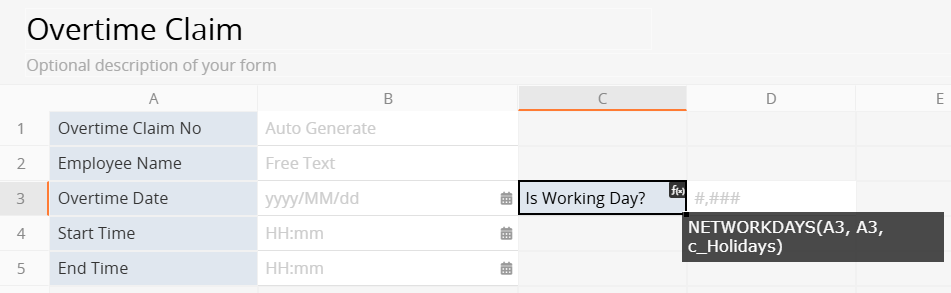
Add a field in the sheet to determine whether a specified date is a working day, and apply the following formula:
NETWORKDAYS(A3, A3, c_Holidays)
For details about the NETWORKDAYS function, refer to this section.
A3: refers to the Date field, for example, "Overtime Date"
c_Holidays: refers to the Global Constant defined in Step 1
This formula determines whether a date is a working day by calculating the number of working days between "the same start and end date". If the date is neither a weekend nor included in the holiday list, the result returns "1". If it is a weekend or a holiday, the result returns "0". The result can be used as a condition in the IF function.
Based on whether a date is a working day, the IF function can be used to return different values, such as applying different overtime pay rates or determining leave eligibility.
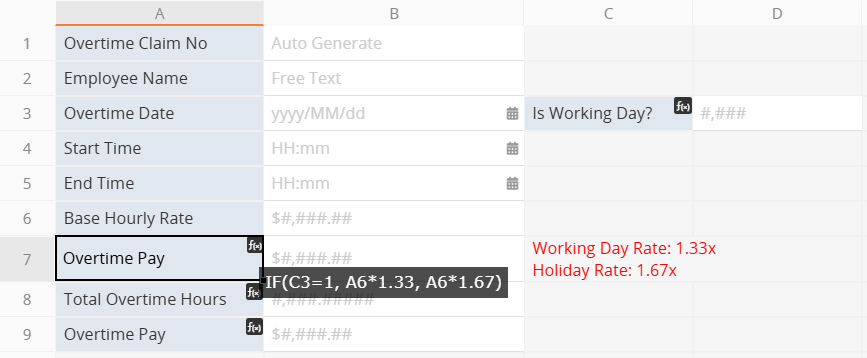
Taking the calculation of overtime pay rates as an example, assume C3 is the result of the NETWORKDAYS calculation in Step 2, and A6 is the "Base Hourly Rate". When the "Overtime Date" falls on a working day, a lower multiplier (for example, 1.33) is applied; when it falls on a non-working day, a higher multiplier (for example, 1.67) is applied.
For example:
IF(C3=1, A6*1.33, A6*1.67)
This allows the system to automatically apply different overtime multipliers based on whether the date is a working day and calculate the corresponding overtime pay.
 Thank you for your valuable feedback!
