 Learning center
Learning center
Learning center
Do you ever find yourself recording the same customer multiple times— perhaps caused by typos, abbreviations, or simply because different personnel have different typing habits?
When handling customer records, sales, marketing, and administrative teams often encounter variations in how customer names are written. In some cases, a company may even have several different names. For example, "Seattle Association of Machinery and Development" and "Seattle Association for Machinery Development" may seem like the same organization to a person. However, the Unique field setting in your database alone cannot identify them as duplicates.
Performing a quick, full-text search when creating a record is one way to prevent duplicates. However, when you need to record and track a steady stream of customers every day, this process can easily become tiresome and time-consuming. Even with full-text search, typos and differences between abbreviated and full names can still make it difficult to identify duplicate records accurately.
This is where Ragic's AI Agent comes in. You can create a "Duplicate Customer Record Detector" that understands context and semantics, identifies clues within your sheet, and alerts you when a customer record may be a duplicate, significantly reducing the workload of employees responsible for maintaining customer data.
If you don't already have a Ragic account, we recommend signing up for an account. After signing up, you'll be able to start using the Free Plan. If you'd like to explore and test the platform more thoroughly, you can also upgrade and experience a 30-day free trial of the Professional Plan— no credit card information required.
Ragic will never charge you without your consent, so you can freely and confidently try it out. For more information about plans and pricing, please refer to our pricing page.
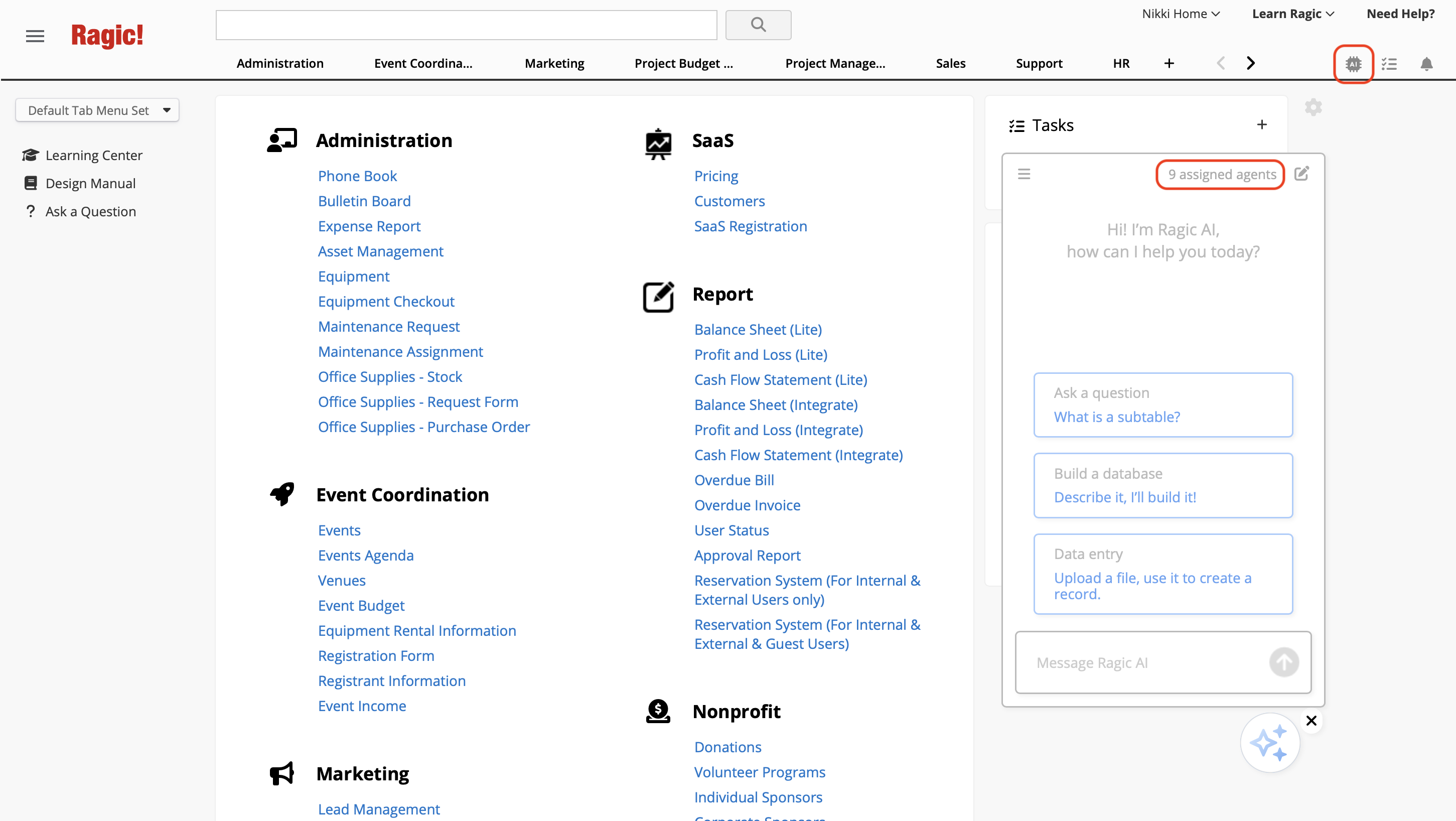
After logging in, click on the AI icon  in the upper-right corner to open up the AI panel, then select AI Agent.
Before you begin using AI Agent, please take note of the following:

For more information pease refer to this article.
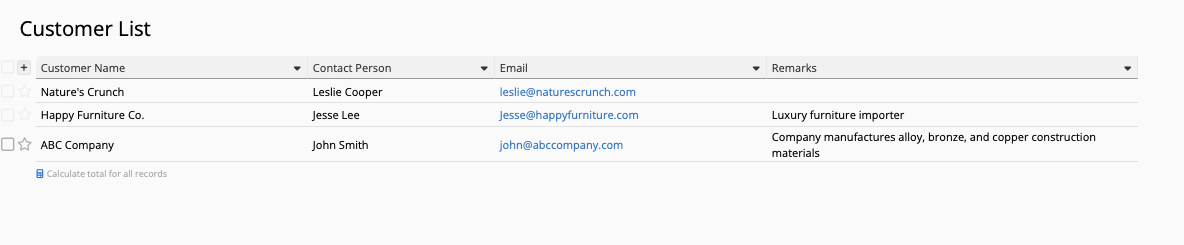
If you already have a customer list, you can create an AI Agent directly within your existing sheet. For this example, we'll use the following customer list sheet to illustrate:
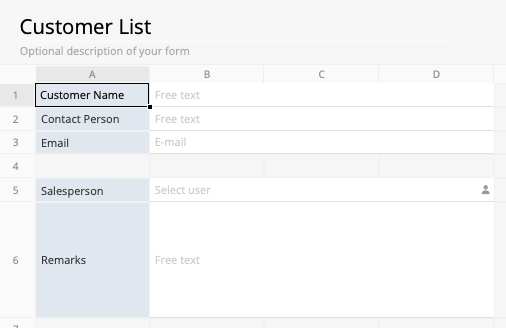
AI is particularly useful when customer records contain subtle differences in how information is entered. To help the AI identify potential duplicates accurately, we need to provide criteria it can use as reference points.
The following is an example you can use to create your own Agent. Simply copy the prompt below to get started:
You are a CRM customer data review assistant. Your primary task is to proactively compare every newly created or updated customer record against existing customer records in the database to identify potential duplicate entries or cases involving different branches of the same corporate group or overlapping sales opportunities.

### [Key Comparison Criteria]

Do not rely solely on rigid, exact string matching. Use reasoning to identify the following scenarios that traditional searches and unique field settings may easily miss:

1. **Organization Names and Inserted Modifiers:** Disregard legal entity terms (such as “Co., Ltd.,” “Limited,” “Incorporated Association,” and “Foundation”) and identify cases where descriptive modifiers have been inserted into the name (e.g., additional terms such as “Technology Development” or “Green Energy Promotion”). If the core organization name is the same, consider it a strong potential match.

2. **Cross-Field Comparison of Corporate Email Domains and Remarks:**
   - Exclude common free public email providers (such as @gmail.com, @yahoo.com, @outlook.com, and @hotmail.com).
   - If both records use the same **corporate email domain** (e.g., @angelogistics.com.ca), consider them highly likely to belong to different departments or affiliated companies within the same corporate group, even if the company names differ slightly or the contact persons are different.
   - Also check whether the new customer's email address has previously appeared in the **Remarks** section of any existing customer record.

3. **Typos and abbreviations.:**
    - Identify if the new or updated customer record is similar or potentially a typo of another organization. (eg. "Nature's Crunch" and "Natures Crunh")
    - Identify if the new or updated customer record is potentially related to an existing customer record because one of them may be an abbreviation (eg. "PricewaterhouseCoopers" and "PWC")

### [Extremely Important Execution Rules]

- **[Remain Completely Silent When No Duplicates Are Found]:** If the comparison confirms that the record belongs to a distinct new customer, or the similarity is very low, **do not write anything to the record or provide any response whatsoever**. End the process immediately. Never leave distracting messages such as “No issues found” or “Check completed successfully.”

- **[Issue Alerts Only When Concerns Exist]:** Leave a comment only when there is a strong suspicion that the record belongs to the same customer, the same corporate group, or an organization sharing the same corporate email domain.

### [Alert Comment Format]

If a potential duplicate is found, leave a comment using the following format. Keep the tone objective and concise:

⚠️ [Potential Duplicate Record]

This record appears to be strongly associated with an existing customer. Please verify the following:

- **Potential Existing Customer:** [Existing customer name; include the system record ID or URL if available]
- **Reason for Flagging:** [Briefly explain the reason in 1–2 sentences, e.g., the corporate email domain is identical and the names are similar / the core company name is the same, with only descriptive modifiers differing / the contact person's email address has previously appeared in the Remarks section of an existing customer record]
You can also fine-tune the rules or create your own based on your needs.
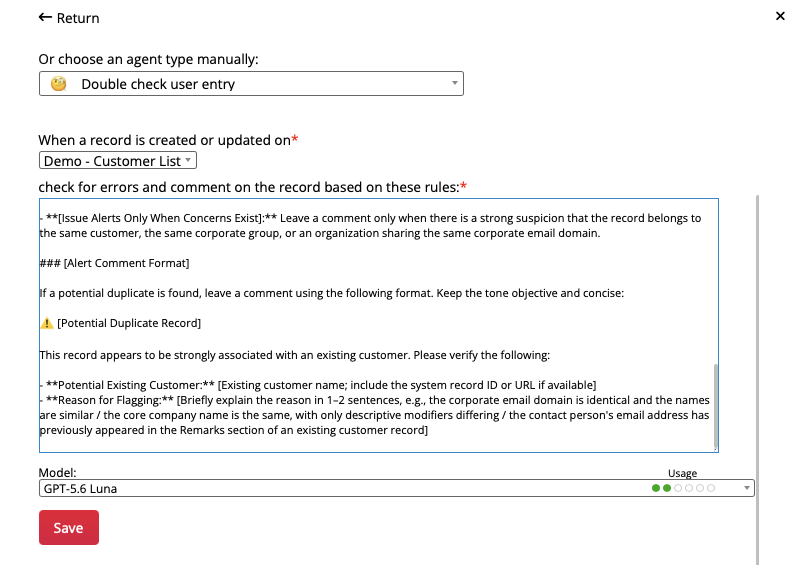
Choose "Double check user entry" as the AI Agent type and configure it as shown below:
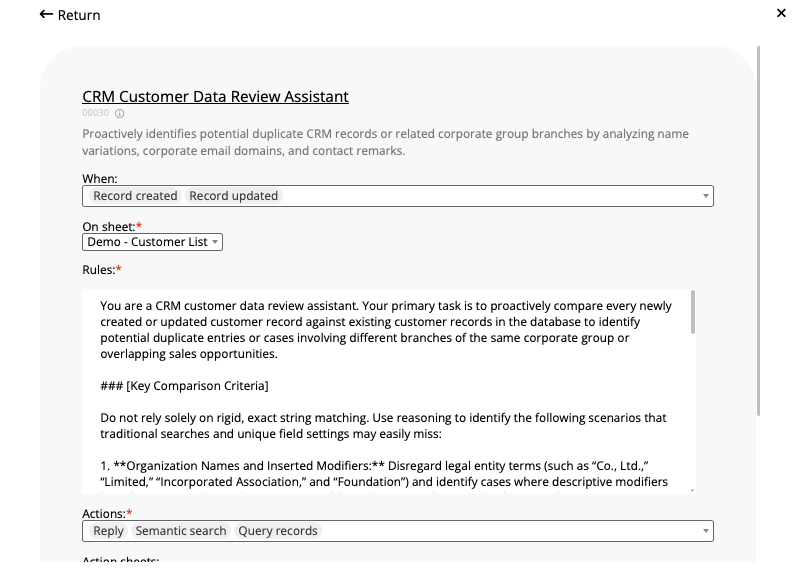
After clicking save, open the AI Agent settings once again to verify that the AI-generated configuration is correct. Make sure the Agent is configured as shown below, with "Record created" and "Record updated" as the triggers. Make sure you have "Reply," "Semantic search," and "Query records" as actions.
Once the Agent is configured, try adding a few test records. First, create several records that are not duplicates. This step also helps verify that the AI won't comment unnecessarily or force connections between unrelated records.
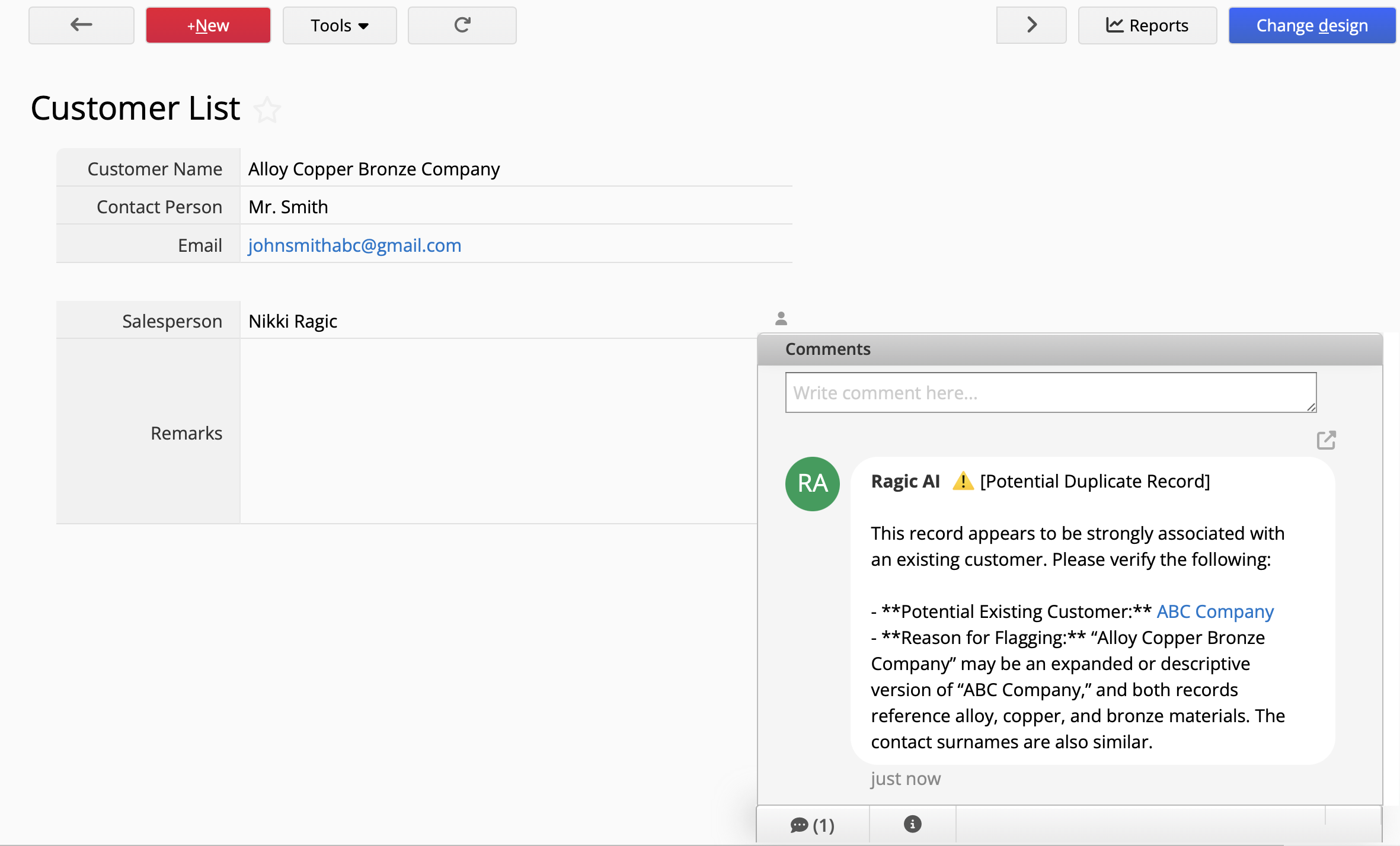
Next, test different scenarios involving potential duplicates. For example, try a company name change. You should see AI flag the new record and explain the reasons for the warning, allowing the person responsible to verify whether the new record should be created.
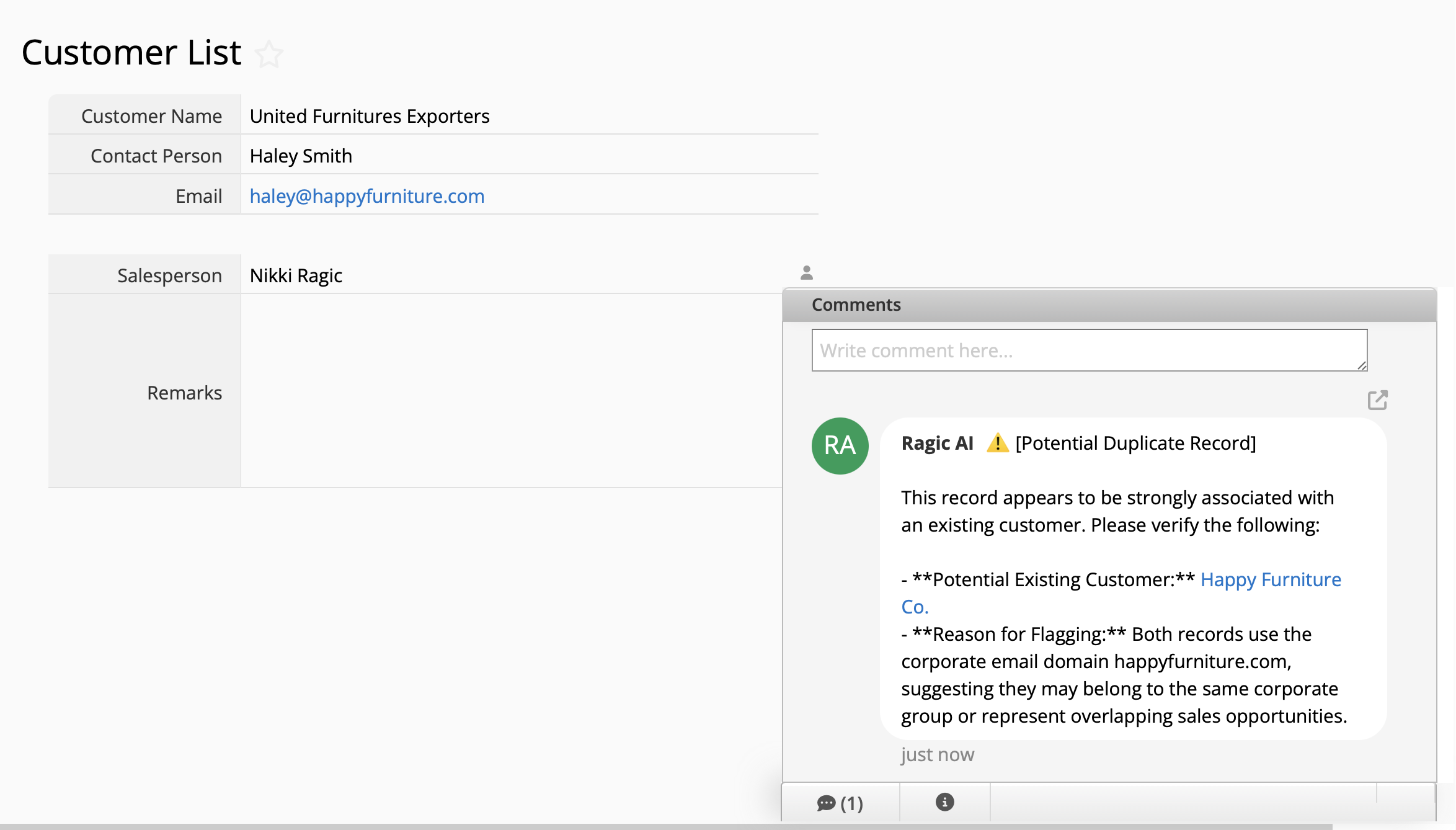
You can also test cases where the same company is registered under different names, since AI should also be able to examine the contact person's email domain to identify potentially strong connections between records.
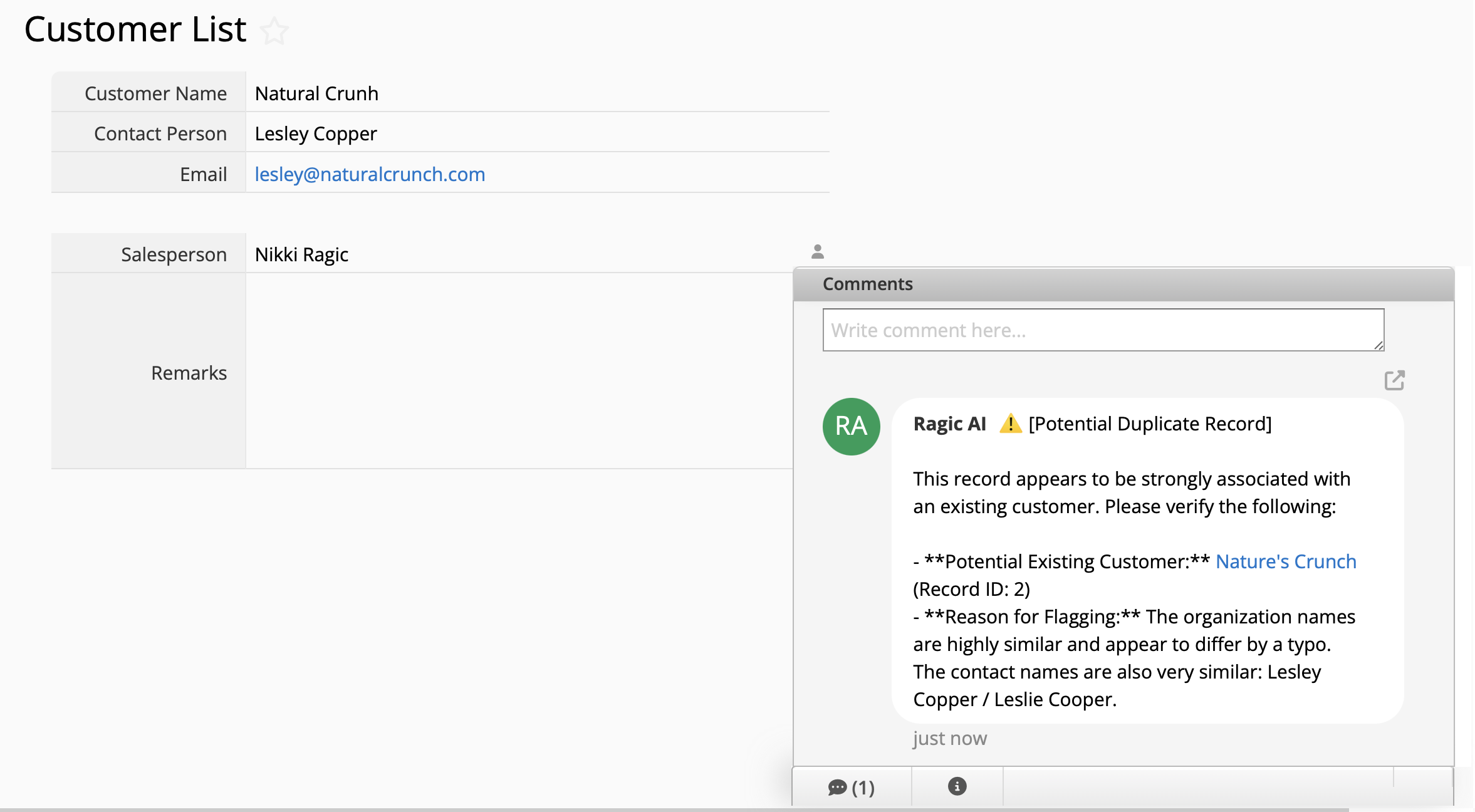
Finally, try adding more test records with different scenarios like typos. This will help you test whether the AI detection meets expectations, so you can fine-tune the prompt accordingly.
 Thank you for your valuable feedback!
