

5 Common Ragic Beginner Questions Answered

Since our team grew and we've had the capacity to offer demos for new and prospective users (if you need one, grab a slot here), we've had a lot of real conversations with people who are just getting started with Ragic.
Many of the questions that surprised us at first turned out to be ones nearly every new user asks. That makes sense. If you're new to Ragic, or to no-code database building in general, you've just been handed the keys to your own workflow digitalization. Most people respond the way you would behind the wheel of someone else's car: very carefully, hands at ten and two. You’d like to know what’s safe to touch before getting to work. After hearing the same ones in demos, workshops, and support tickets, we've collected the five that come up most.
TL;DR to the answers:
- You can edit your sheets any time
- Field layout doesn't affect how things work
- You don't need an IT background
- Ragic is built from flexible pieces, not a fixed feature list
- Customizing your own database costs nothing extra
If you're new to Ragic: read this before your demo, or before you start building, and you'll be able to quiet that little "what if I break something?" voice in your head. You have more room to experiment than you think.
If you're a Ragic champion: steal these answers the next time a coworker asks, "Wait, so how does this actually work?"
#1 Can I edit a sheet after I've built it?
Yes. You can change your sheet design whenever you need to.
Many people assume a finished sheet is locked in, the way it would be in an off-the-shelf software, and that changing it could break something, or could just be extremely expensive. Ragic is designed the opposite way. Being able to adjust your sheets with a few drags and clicks is a big part of why it's no-code.
Say you set up a simple customer sheet when you started your business. A year later, you want to sort customers into tiers. Open the sheet, add a "Customer Tier" field, and keep going. Your database grows with your company.
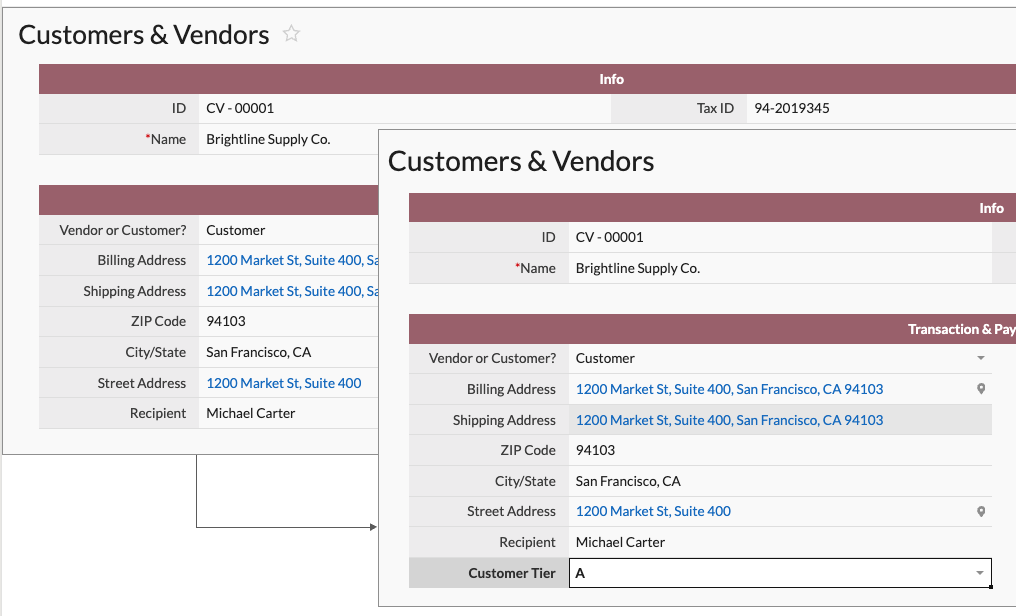
Adding fields, removing them, or restyling the important ones is all routine. The one time to slow down is when you have many connected sheets. Then take extra care when you change the type of a field that already holds data, or edit fields used in links and loads. Our documentation lists the specific cases to watch.
Otherwise, don't treat a sheet as "done." Keep improving it.
#2 My fields are in a different order than the tutorial. Is that a problem?
No. Layout has no effect on how your system works.
If you can use a spreadsheet, you can use Ragic. You're working on a blank canvas, so arrange fields however makes sense to you. There's no standard layout to match, and yours doesn't need to look like a tutorial's.
Two related questions come up often.
1. Can two fields have the same name?
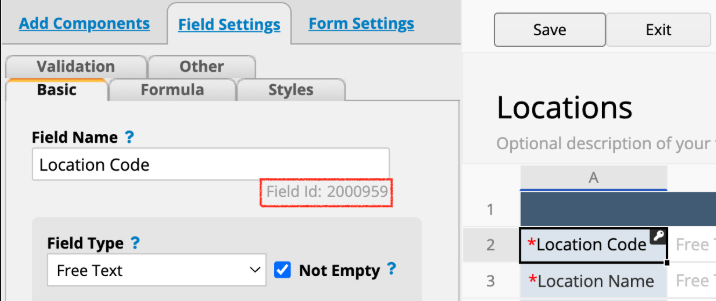
Yes. A quote might have two "Contact Name" fields, one for your customer's contact and one for your own sales rep. Ragic identifies fields by field ID, not by label. When you set up mail merge, custom print report, or custom email, you reference the field ID, so the right data always ends up in the right place.
2. Can I move a field that's used in a formula?
Yes. Drag it anywhere in design mode, and Ragic automatically updates every formula that references it. There's nothing to fix manually.
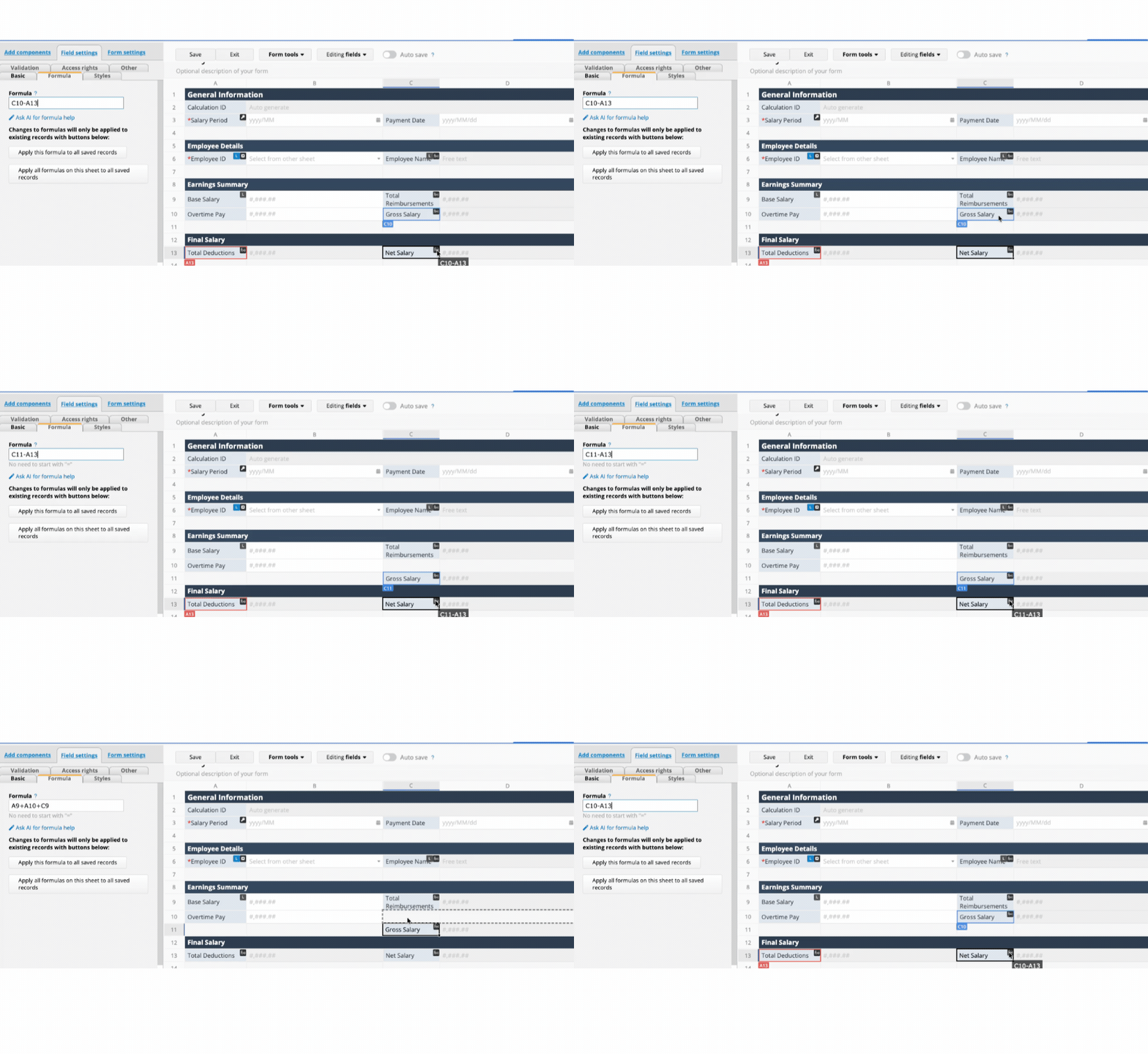
Automatically changing a formula field when the field is moved
#3 Your team must all be engineers, right? You make all of these sounds so easy because all of you have an IT background right?
Fact is: Most of our support staff, sales reps, and marketers don't have IT backgrounds, and neither do many of our power users. Knowing your own business process matters way more than knowing how to code.
A lot of teams assume this isn't for them. We often hear "We're not technical people." But we’d like to push back on that.
Think about your own workplace. There's probably someone who lives in spreadsheets and keeps refining them to get work done faster. They're rarely trained developers. They're just the people who understand the business logic and know how to turn a need into a working process with the tools at hand.
The same thing is happening with AI. Plenty of people who've never written code are now using ChatGPT, Claude, or other AI tools to build small web tools and automations. They succeed because they can describe what they want clearly, and that comes from understanding their work.
Plenty of Ragic users have never written a line of code. Pete from Cameron Racing and John from Do It Best are two of them. They simply know how their company works, and they decided to do something about it. Check out their stories, along with other use cases we've collected.
#4 Can Ragic handle batch tracking, multi-currency, and multi-warehouse inventory?
Reality: These are good questions, and the answer is often "yes, you can build that." It just isn't always a simple yes or no.
Our typical answer is "we can probably build that" or "try combining these features". You probably won't get a flat "we have that feature" or "we don't."
That's because Ragic is a no-code platform, not a packaged ERP. Packaged software ships with predefined modules. If you want batch tracking, you check the vendor's documentation, switch the module on, and the sheets and fields appear. The rules are already written, so a feature is either there or it isn't. (It's also often a paid add-on.)
A no-code tool is more like a box of LEGO. You get a set of pieces, and whether you can build the thing you have in mind depends on how you plan it and put it together.
Take lot or batch tracking. Start by breaking it down:
- What do you need to record for each batch?
- Is it only the batch number and manufacturing date?
- Do you also need to know who inspected the shipment?
Then you can compare your answers against our existing resources. We have a batch management tutorial that covers the core structure and the common design paths, so you can pick the approach that fits your process and adjust it from there.
You'll do a bit more thinking up front than you would with ready-made software. In exchange, the result fits how your company works and stays flexible as your needs change.
Not sure if something is possible? Build a small project. The fastest way to get the no-code mindset is to spend 30 minutes building a basic order management system with Customer, Product, and Order sheets. After that you'll have a feel for how sheets come together, and advanced topics like batch tracking or multi-warehouse inventory will make a lot more sense.
#5 Does customization cost extra?
No. Customizing your Ragic sheets means assembling your own process from the features we provide. The only thing it costs is your time and effort.
"Customization" often brings to mind hiring developers, writing specs, and paying a large bill. In Ragic, customization means assembling your own process from the standard features we provide, and you can use all of them at no extra charge. The only cost is your time.
If a process gets complicated, or you'd rather not maintain the database yourself, you can bring in one of our partners. That works like a typical custom project: you agree on requirements and pay according to their quote.
Still have questions? We're here.
We hope this gives you a clearer picture of what Ragic is and how it works.
If you have more questions, or you get stuck while building, Ragic AI can help. Ask it in plain language, such as "I want to build a multi-warehouse inventory. How should I design the form fields?" and it will give you specific design suggestions. If you already have a fairly complete idea of what you need, you can describe it all to Ragic AI and let it build a first version of the database for you to refine.
We also have a wide range of documentation and support resources ready for you. Check the further reading below, and don't hesitate to reach out.

