

Why Port Authorities Are Turning to No-Code Tools. And How to Choose the Right One
Why no-code tools make sense for port authorities
The past few years at Ragic, we’ve seen increasing adoption by port authorities. And as we work with more and more port authorities, we realized this shift isn’t driven by trends or experimentation. It is due to very practical, operational needs.
A few patterns come up again and again. Ports don’t operate like typical government organizations, and that difference shapes how they choose their systems. In many cases, no-code tools become the solution they turn to. Below are the key patterns we consistently notice that become the reason:
Ports move faster than traditional government organizations
Compared to many public sector organizations, port authorities face much more immediate operational pressure. Delays don’t just stay on paper. They affect ships, cargo, and real money.
Because of this, ports are often more open to lightweight, adaptable tools that can be rolled out quickly, instead of long procurement cycles tied to large, rigid vendors. A no-code database, with its intuitive interface for adjusting workflows allows teams to respond faster as conditions change and keep operations moving without waiting on external developers, as they would with off-the-shelf solutions or legacy systems.
A hybrid organization between government and business
Port authorities sit in a unique middle ground. They are public entities, but they run revenue-generating operations and work closely with private companies every day.
This hybrid nature means traditional government IT systems often feel too slow or too inflexible, while pure business tools don’t always fit regulatory and accountability requirements. No-code tools like Ragic work well in this middle space. They offer the structure and control ports need, while staying flexible enough for real-world operations.
Constant coordination across departments and external agencies
Running a port requires tight coordination across safety, operations, finance, environmental compliance, and often multiple external agencies.
Unlike other government entities that can operate in silos for longer, ports cannot. Information needs to be shared, updated, and trusted in real time. This creates a strong demand for a shared, structured data system that everyone can rely on.
Mobility matters too. Some users are office staff working at a desk. Others are customs brokers on the move, inspectors in the field, or staff working on the dock. A system that works smoothly across desktop and mobile isn’t a nice-to-have. It’s essential.
High operational complexity, but no room for heavy IT systems
Ports manage vessel schedules, berth allocation, cargo records, permits, inspections, contractors, safety incidents, and compliance reporting. Many of these workflows are highly specific to each port.
Off-the-shelf government systems are often too rigid to adapt. Spreadsheets might work at first, but they break down quickly as data grows and coordination increases. A flexible, structured database built with a no-code tool fills this gap naturally, without requiring a large IT team to maintain it.
A practical checklist for choosing a no-code tool
But how do port authorities choose a no-code tool that actually fits their operations and can be sustained long term? The market is crowded, and on paper, many tools look similar.
Based on our conversations with port authority users, we’ve put together a practical checklist you can use when evaluating no-code tools for port environments.
1. Can the system support coordination across internal teams and external stakeholders?
Most port authorities don’t just work across multiple internal departments. They also need to coordinate daily with external parties such as shipping lines, customs brokers, and logistics firms.
This means the system must constantly receive data from external parties and share updates back to them, while still acting as a single source of truth for both internal and external parties. When evaluating a no-code tool, this creates two critical requirements: easy data sharing with external stakeholders, and secure access control that reflects real operational roles.
Easy data sharing with external stakeholders
In Ragic, external parties can be added as external users, free of charge, with no licensing fees for the port authority. There is no limit to the number of external users. These users are not given one-time access links. They are real accounts within the system.
This means external users can:
- Submit entries, such as vessel arrival notices
- Return later to check the status of entries related to them
- Follow up without relying on emails or phone calls
In practice, this often becomes a deciding factor. Many tools work well internally but fall apart once external agencies need access. Licensing restrictions, limited sharing options, or cumbersome login processes frequently push teams back to email and spreadsheets.
Secure data sharing through granular access control
Ease of sharing must always be paired with security.
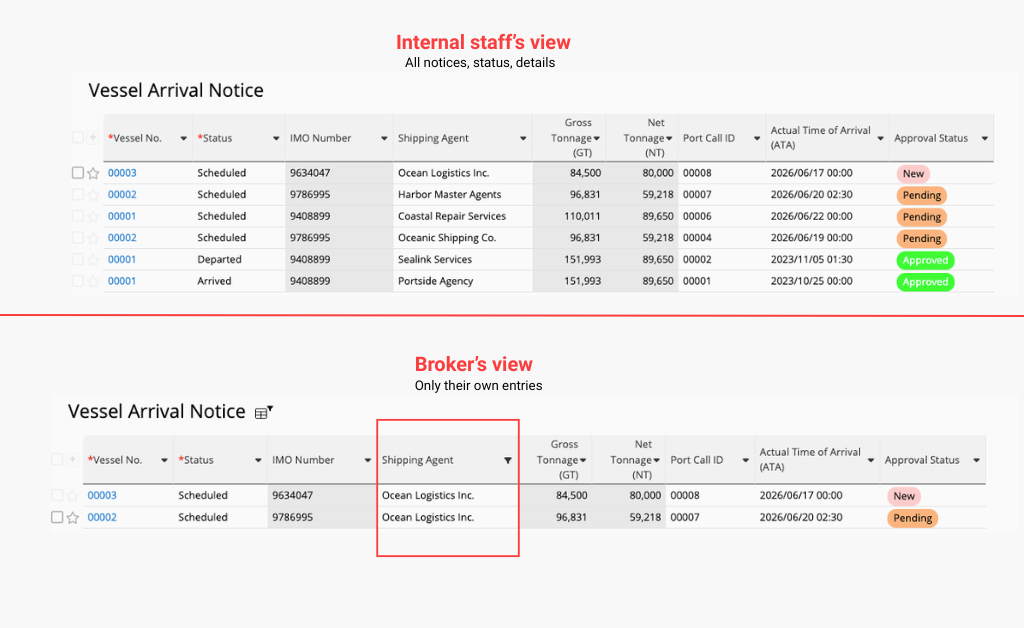
Not every user should see the same data or have the same level of control. Internal staff who manage operations may need full visibility across all records, while external brokers should only see and edit the entries they submitted themselves.
For example, in a vessel arrival notice workflow:
- Internal staff may need to review, approve, or manage all submissions
- An external broker should only be allowed to submit a notice, edit their own entry, and check its approval status
- They should not see submissions made by other brokers
Ragic supports this through five levels of access rights, including field-level permissions, allowing ports to control exactly who can see and act on what, even within the same sheet. These settings are configured through a simple, “what you see is what you get” interface, without requiring technical expertise.
In this setup, internal staff can be assigned an Admin role with full control over all entries, while brokers can be assigned a Survey User role. Survey Users can submit and manage their own records, return later to check follow-ups, but cannot access data submitted by others.
2. Is it easy to build and easy to use for non-technical users?
Easy to build
One of the main reasons port authorities turn to no-code tools is the lack of technical resources. The systems they need are often as complex as custom-built solutions: multiple levels of access rights, very specific workflows depending on who they’re dealing with, clear separation between internal staff and external parties.
At the same time, they’re not always equipped with the IT resources to support this level of complexity. Sometimes there’s one person with an IT background in charge of everything. Sometimes there isn’t even that. Just a team that has been struggling to make things work with Excel sheets.
Either way, they need a quick and practical way to centralize their operations. The requirements are complex, but the resources are limited. Hiring a development team isn’t realistic. Relying on one person to build and maintain a coded system is often too slow, especially when workflows need to change frequently.
This is where a no-code tool like Ragic becomes a practical solution. With a low learning curve, it allows non-developers to quickly pick up how to build and adjust a system themselves. The “what you see is what you get” interface makes it possible to build systems that are just as structured and sophisticated as low-code solutions, without writing code.
For port authorities, this typically includes capabilities such as:
- Approval workflows with conditional rules, such as different approval paths depending on vessel type, cargo category, or submission source
- Setting up notifications, allowing teams to follow progress without manual follow-ups
All of this is configured through a spreadsheet-like interface, which feels familiar to teams coming from Excel, but without Excel’s limitations in access control, workflow, and scalability.
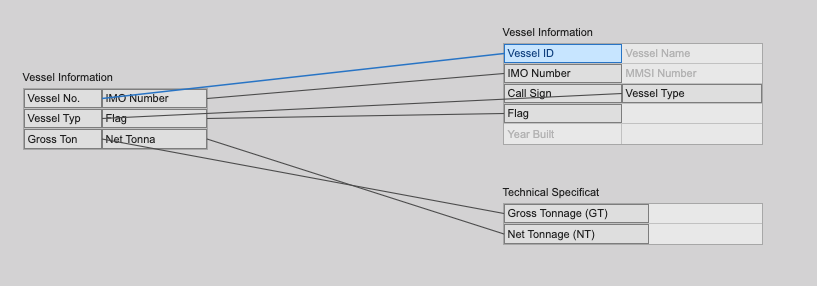
Building relationship between data in Ragic
Easy to use
After the system is built, the adoptability is now the key. External parties don’t deliberately choose to use your system. They simply have to comply with it. Some may not be naturally tech-savvy, but their cooperation is essential for port operations to run smoothly. If the experience is painful, adoption breaks down quickly.
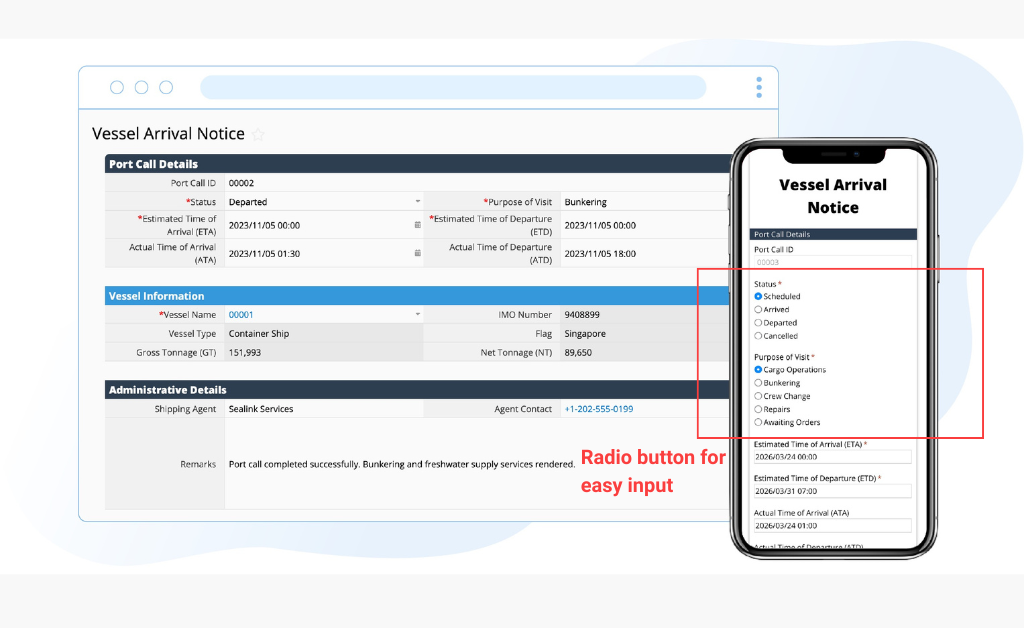
In Ragic, we’ve heard consistent feedback from port authorities that this makes a real difference for external users. Even fishermen, shippers, or brokers who are not particularly technical are able to complete submissions faster when the interface is simple and clear.
Features such as mobile access for on-the-go users such as field staff and dock workers, and minimal-keystroke input, like radio button options instead of long text fields when filling in a webform, significantly reduce friction when filling in required information.
3. Does the system support structured approvals and accountability?
Port authorities operate under strict accountability. Many actions cannot move forward without proper review, sign-off, or formal confirmation. Whether it’s vessel clearance, inspection results, permit issuance, or exception handling, every step needs to be traceable and defensible.
In reality, teams often end up choosing between control and flexibility. Traditional government systems allow approval setup, but they tend to be rigid. Making even small workflow changes can take time or require vendor support. Spreadsheets sit at the opposite end of the spectrum. They’re easy to adapt, but once a process involves multiple reviewers, there’s no reliable way to track who approved what, when a decision was made, or what changed along the way.
In Ragic, approvals can be set up easily within the workflow. Each record can move through clearly defined approval stages, with conditions determining who needs to review or approve at each step. Approvals can be triggered based on specific criteria, such as vessel type, risk level, or the department involved, without hard-coding rules.
Every approval action is automatically logged. The system records who approved or rejected a request, when the action happened, and what the status was at each stage. This creates a clear audit trail that can be reviewed later, shared internally, or used for compliance and reporting purposes.
In practice, this allows port authorities to maintain accountability without locking themselves into rigid processes. Approval workflows can evolve as regulations or operational needs change, while teams still have clear visibility into where a request stands, who needs to act next, and what has already been signed off, without relying on email threads or manual follow-ups.
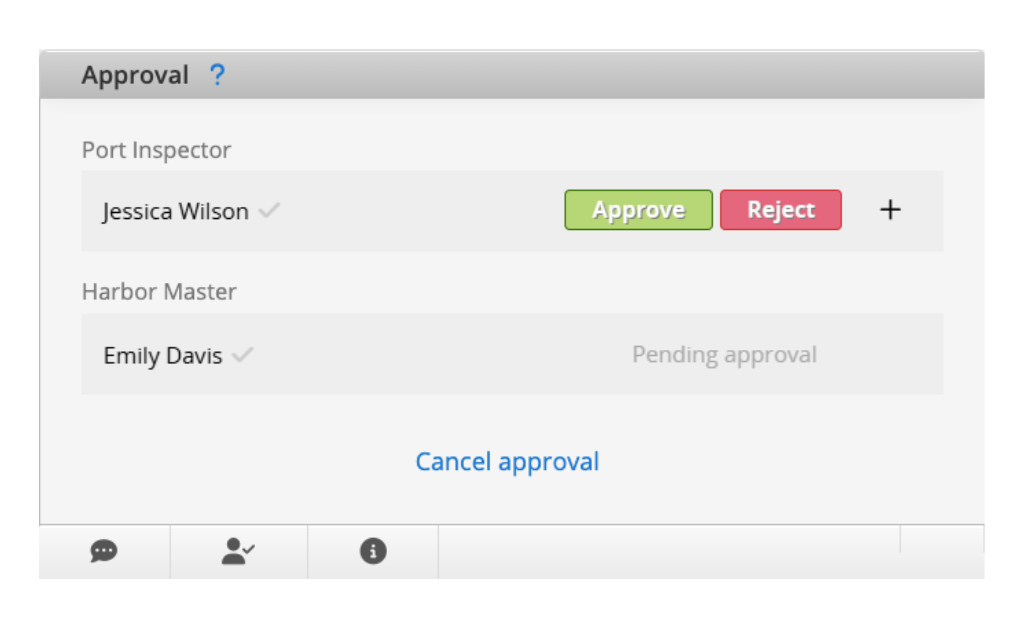
Approval workflow in Ragic
4. Is your government data secured? Is there any backup and disaster prevention?
For port authorities, data isn’t just information—it’s the backbone of daily operations and regulatory compliance. Vessel schedules, cargo manifests, inspection reports, permits, and stakeholder records must remain accurate, private, and continuously available. A single outage, corrupted file, or unauthorized access can halt operations, disrupt revenue, and trigger compliance issues.
Ragic addresses these concerns with multiple layers of protection and recovery. Like mentioned above, access is controlled through role-based and field-level permissions, ensuring internal staff and external users only see and act on data relevant to them. All data transmission is encrypted, and system activity is logged for full traceability. Daily backups are performed, with copies stored in separate locations for disaster recovery. Administrators can restore databases themselves if needed, reducing downtime without depending on vendor intervention. Additionally, Ragic maintains ISO/IEC 27001 certification, GDPR compliance, and secure cloud infrastructure, giving ports confidence that data is both protected and recoverable in case of incidents. For more information about data security in Ragic.
This ensures that port authorities can operate continuously, meet regulatory requirements, and maintain trust with internal and external stakeholders, while mitigating the risks associated with data loss or unauthorized access.
Category: Applications > Use Cases

