
Inventory management has a broad scope that often connects purchase receipts (inbound inventory) to order shipment (outbound inventory). It covers everything from when items enter the warehouse, their quantity, location, movement within the warehouse, and final delivery to the customer.
You can think of inventory management as a registration system, where all items in the warehouse must be properly registered as they go through the various stages of their life cycles within the warehouse. This maintains a complete control over the status and location of each item. That is why in order to do inventory management, we need to first record each item's information such as their basic attributes and names, while using product numbers as their "IDs" in our warehouse.
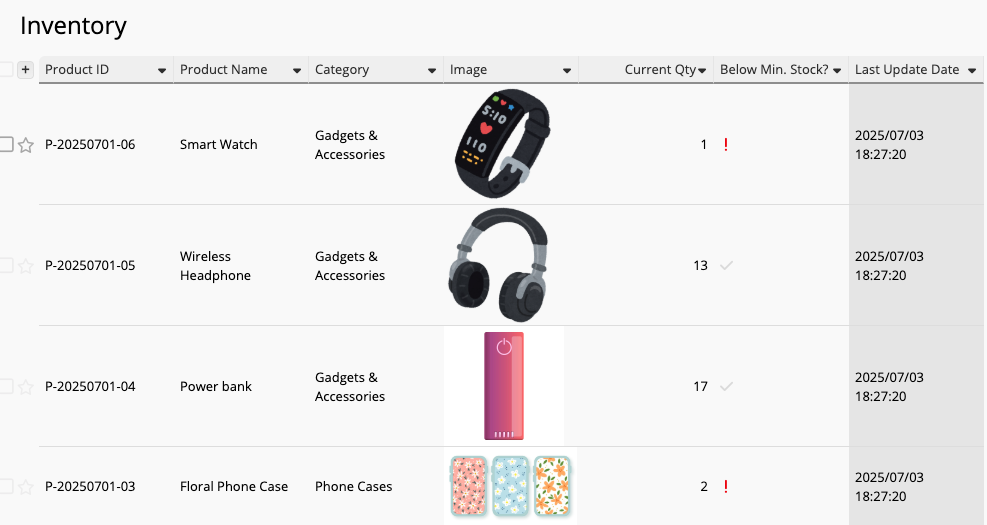
Every time the quantity needs to be modified, such as an inbound (receipt), outbound (shipment), or transfer order, a record needs to be created. This allows us to check the items' status at any time.
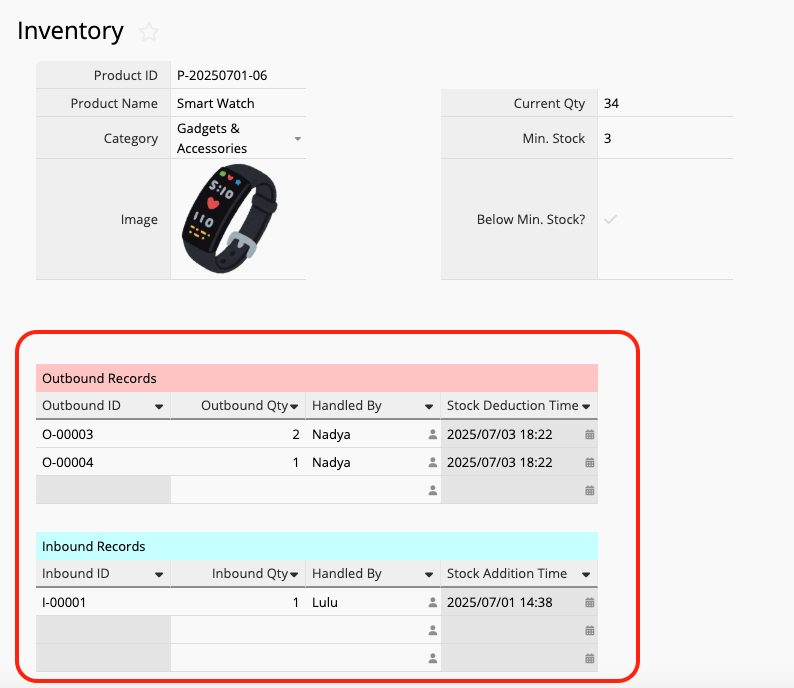
Basic inventory management explains when, where, and how an item enters or leaves the warehouse, as well as the quantity that is currently stored there. How can an inventory management system change your workflow and how can it make things more efficient for your business?
Without a system, the inventory master file, inbound, and outbound slips are often three completely separate files that cannot be linked in real time. In this scenario, the responsible personnel must first check the inventory master report or even go check the warehouse in person, every time items needed to be moved in or out. After filling the inbound and outbound slips, they must update the inventory master file, which can be cumbersome, repetitive, prone to human errors.
The greatest value of an inventory management system lies in its ability to connect various different documents and processes. During inbound and outbound operations, inventory levels can be increased or decreased in sync with actual operations. As a result, the inventory master file would always reflect the actual inventory levels, eliminating the need to go to the warehouse every time a slip is filled out.
When using paper documents or separate Excel files, one of the most tedious process is often the repetitive data input. If several items need to be shipped out each day, you need to repeatedly enter the same information. After each shipment order, you need to update the inventory quantity on Excel. This is a time-consuming process.
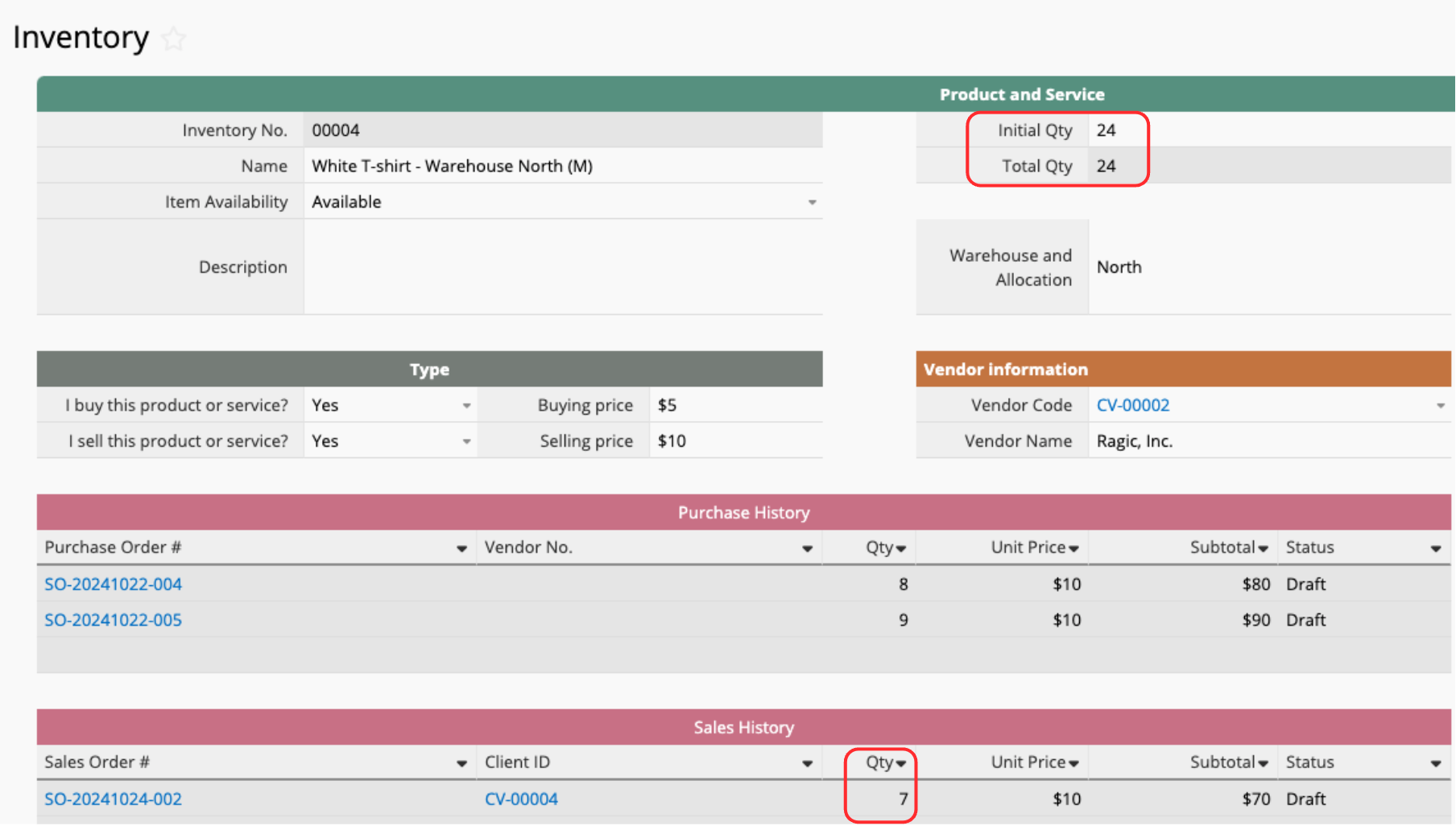
An inventory management system can simplify these administrative processes in various ways. For example, you can automatically update the existing inventory quantity once a sales order is generated.
Alternatively, you can also simply press a button to automatically update the inventory quantity after completing an outbound slip.
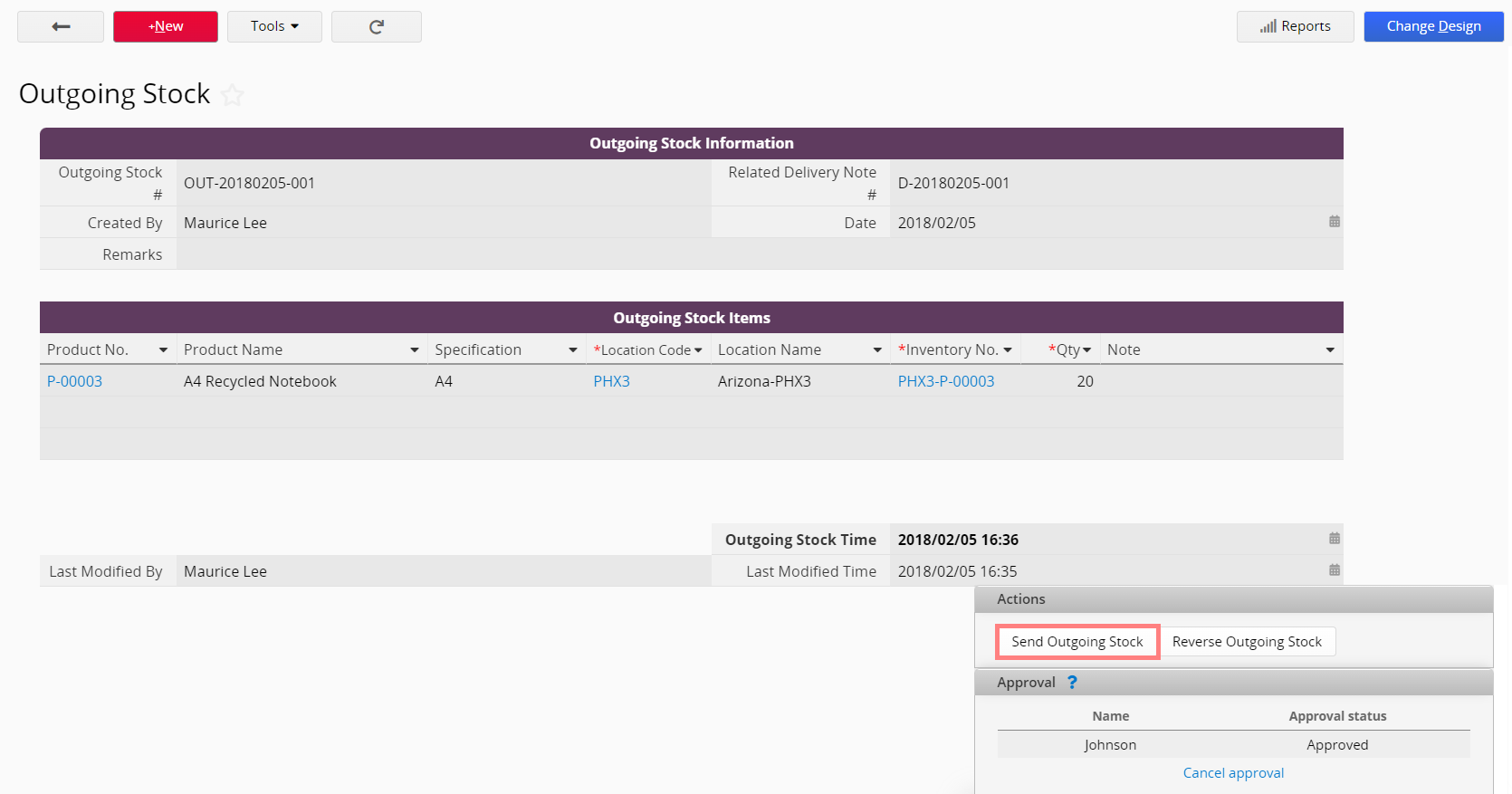
These processes don't require you to repeatedly check and modify the inventory master file. Simply fill out the sheets naturally as you handle inbound and outbound operations, and the system will automatically manage your inventory levels.
Additionally, if you choose a cloud-based inventory management system, you can also eliminate the need for waiting to fill out forms, since everyone will be able to fill out inbound and outbound forms simultaneously without queuing.
Without a system, inventory lists cannot be linked to historical records. When you have doubts about a certain number in the master inventory list, you'd need to manually search through the entire company's inventory records to find the record you need.
With an inventory management system, this process is much simpler— You can directly see the inventory records for each item, allowing you to trace how each inventory quantity was calculated, ensuring that every change is "backed by solid evidence," and giving you a peace of mind about the inventory figures.
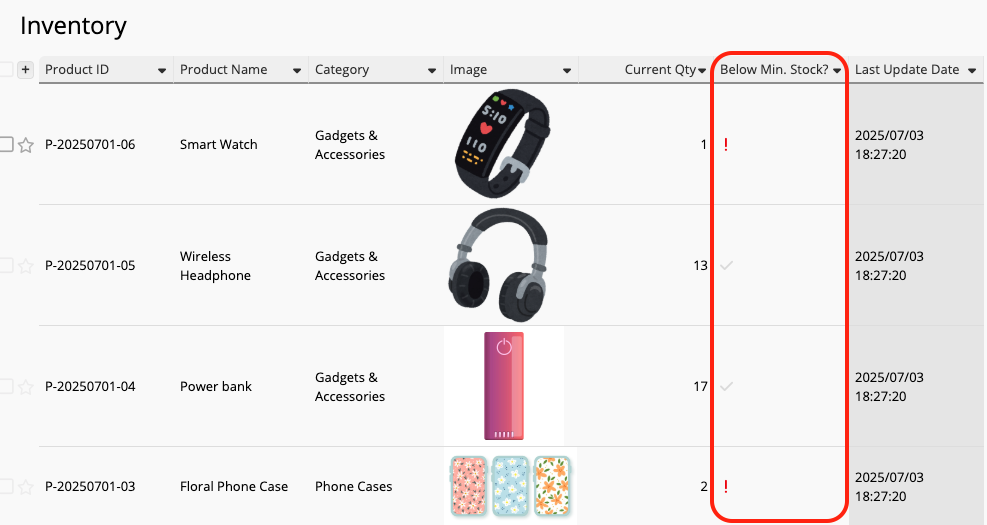
Aside from having accurate numbers, a good system proactively performs "health checks."
For example, if an item's inventory is too low, it may require emergency restocking or cause shipping delays. If inventory is too much or has been piling up for too long, it can lead to extra storage costs and wastage. In Excel, you can only use conditional formatting to turn the column red when it reaches a certain number, hoping the employees would notice and consider this when making purchasing and promotion planning decisions.
Inventory management systems often have a more "proactive approach." For example, you can ask the system to automatically send an email to the responsible personnel when the inventory quantity reaches a certain threshold.
If you search online for inventory management systems, you'll find that there are many types of "systems," and they can generally be categorized into the following:
For companies with a tighter budget, less time for data migration, or are skilled in VBA development, Excel and VBA may be the most suitable choice to develop customized and automated functions at a relatively low cost.
For example, you can write VBA code to create a button that deducts inventory, or have the system detect inventory levels and send notifications via Microsoft Outlook when they fall below a certain threshold.
However, it is important to note that VBA requires developers to have a certain programming background, and code written by different people may differ. When the person originally in charge of the VBA code leaves the company, it can cause many maintenance problems for the company going forward. Additionally, since we're still using Excel as the base program, certain Excel-inherent issues such as collaboration, loading time, and crash issues can still happen as business volume and data increases. It is important to take this into consideration when looking for a suitable and professional system.
Hiring someone to develop a customized system is a common option for businesses that require significant flexibility. Some companies choose to hire additional engineers internally or external contractors to develop their own in-house systems through programming.
The advantage of this method is that you can freely provide your requirements to the engineers, allowing them to fully develop your ideal system. You can also have the engineers evaluate its integration capabilities with other systems. However, this process can be extremely lengthly. Businesses would need to confirm many specifications and details of system operations, as well as personally verify whether the system operations match expectations. Because of this back and forth process, some companies may find that hiring someone to develop an in-house customized system may not be very cost-effective and efficient.
This is also usually the most expensive option. As your business grows and evolves, the finished system may no longer meet your needs, and you'll need to renew the maintenance contract and invest more resources into the system.
Aside from designing a system from scratch, another option is to acquire pre-built software packages. These usually have entire processes hard-coded into the system, and they usually have 2 sales models:
Standalone software packages operate on the principle of "buying a single license and tying it to a single device." This allows you to acquire a usable, standardized inventory management system at a relatively lower cost or through a buy-out option.
After years of updates and iterations, this type of software is usually very stable with few bugs, but they generally offer limited upgrade opportunities.
Generally, a single license for a standalone software package can only be installed onto one device. However, if your company requires multi-device collaboration, some software offer a "local area network version" with a single company license that can be installed onto multiple computers within the company. This allows you to access the same database across multiple devices via the company intranet.
At times, standalone software packages may be bundled with store-purchased equipment, such as a physical POS terminal (POS machine) that may have basic inventory and order management functions.
Aside from licenses, ERP systems often bundle consulting fees, maintenance fees, and other add-ons. The implementation cost for ERP systems is usually much higher than standalone software packages. After the initial purchase of the license and consulting fees, there are optional maintenance fees to ensure the system can grow with the company and be updated stably in the long run. Well-known examples include SAP, Oracle, and SmartERP.
During implementation, the system vendor will assign a consultant to assist the company. Compared to standalone software, this approach emphasizes service and immediate support.
Unlike standalone software packages, ERP systems allow businesses to communicate to consultants regarding implementation of additional modules or making minor modifications to the system, which offers great flexibility.
However, both standalone software packages and ERP systems typically have the same drawbacks: The data relationships and field settings are generally not easily modifiable, and data transfer is usually limited to a single system, with little room for expansion or integration with other systems. If your company's operations are not "standardized" or if you require synchronization with multiple other systems, you will need to adjust your business processes and data recording workflows to adapt to this type of software packages.
Unlike traditional standalone software packages, cloud-based packages not only provide an operational system but also handle the operation and maintenance of the underlying servers and basic services. Users don't need to install the software to a specific computer or server. As long as they have an internet connection, they can access the system anytime, anywhere.
Compared to standalone software packages, cloud-based software packages are generally charged on a subscription basis. Some cloud-based packages offer features in different value-added services. When using cloud-based software packages, there are usually no additional consulting or maintenance fees. The monthly licensing fee for all services ensure smooth system operation and comprehensive customer support.
However, cloud-based software packages can still face problems. If users find that the standard processes within the system don't work, they still need to find ways to adapt their workflows.
The key feature of no code tools is that "anyone can easily design a system," so when users encounter incompatible system processes, they can modify and adjust the workflow themselves. This is especially suitable for users with limited budgets or those who wish to customize system operations. For example, Ragic allows you to create a usable inventory management system using a familiar Excel-like interface. By simple clicking and drag-and-drop, users can leverage the system's built-in features and quickly make adjustments that suit business needs.
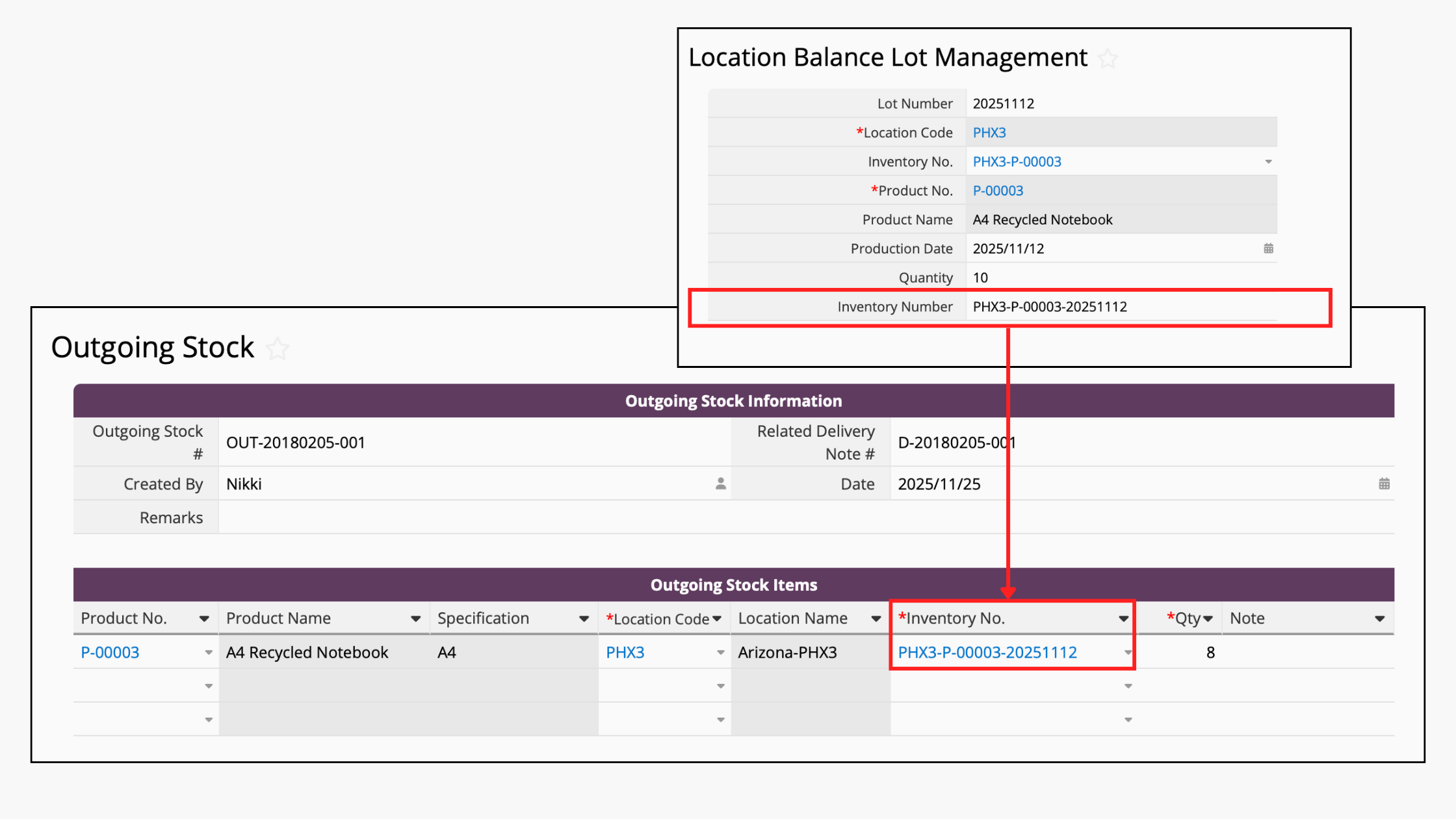
Its biggest advantage is that you can build a customized system based on your understanding of business workflows at a cost similar to cloud-based software packages. Pricing structure is typically a monthly or annual licensing fee, without the need of hiring additional professional engineers.
No-code software itself requires users to set aside time to learn how to operate it, but many no-code tools now offer diverse ready-made templates to help users get started quickly. By simply following the tutorials, users can easily learn the applications themselves.
Perhaps you may still be unsure which of these 5 options is best suited for your business.
If your workflow closely matches the packaged software's design, you might want to consider whether the system should remain on-premises or be cloud-based. Next, you should decide whether to install a small packaged software or consult with the software vendor for a larger ERP solution.
If your budget is sufficient, but your workflow seems somewhat incompatible with the package software, you can list your requirements and have engineers assist with in-house development. This offers maximum flexibility to design what you need, but may require a longer development time and intensive back-and-forth communication.
If you have skilled programmers on your team but wish to save on costs, developing a system directly using Excel and VBA is a simpler option with the shortest migration period. However, if you have encountered collaboration challenges and low performance issues with Excel previously, VBA alone is usually not enough to solve these issues.
If you wish to minimize costs and prefer to build your application yourself but lack the technical resources to do so, then a no-code platform is your best partner. They take little time to learn, but with some understanding, you can create workflows that suit your needs in no time— perhaps in half an hour.
Ragic is one of these platforms. We've pre-designed various ready-made templates to suit many common business scenarios. For example, we have inventory management modules or "packaged" inventory management modules covering procurement to shipping.
Don't worry too much about not being able to implement the features you need. We provide a number of tutorials and several common inventory scenarios. For example, if you need to design an system that scans barcodes and tacks inventory, this video might be helpful for you:
You can simply follow the steps to set up your own system. You can also contact our customer support team for any assistance needed and receive some tips and design suggestions.
Unlike many traditional systems, Ragic does not have any hidden add-on costs. Simply choose the best

