

Inside Ragic's Support Ticket Management System

Whenever you send us a support ticket, have you ever wondered how our Support Team manages to respond within 48 hours, juggling a multitude of inquiries ranging from system bugs to database design intricacies?
✨ Fun fact: Within the Ragic Team workflow, we rely on Ragic for practically everything, including support ticket management. This system works seamlessly to streamline our skilled customer support team's efforts, making email organization, referencing past records, and collaboration effortless.
1️⃣ Every incoming email is 1 record created
Every incoming email is transformed into a single record within our customer service system. This automated process captures the complete interaction history, enabling our team to swiftly review and respond to emails from various sources.
How does this work? Every sheet in Ragic has its own email address. When an email is sent to that address, a record is created in that sheet automatically. You can also fill in the sheet’s fields with parameters, so the details of the email go into the right fields without anyone typing them in. To learn how to set it up, check this document.
This setup could apply not only for ticket management, but also, for example, Request for Quotation, Order Inquiries, etc. Think anything that you receive via email, and you need it recorded in Ragic. So instead of doing it manually, it could be automated.
2️⃣ Assign, not forward
For efficiency, we directly assign specific tickets to colleagues with expertise in the relevant topic.
(2026/11 update: If you want to automate this process, you can also set up an AI agent to handle the task assignment for you. Read the set up details here.)

3️⃣ Efficient reference with Full-Text Search
Facing confirmations or challenging queries? Our database's Full-Text Search capability allows us to find relevant information swiftly, avoiding the need to start from scratch. Past customer service interactions stored in the database ensure future inquiries are handled with precision.
4️⃣ Reply template
Repetitive answer? Get it done with 1 click.

For those in need, we're offering this template for free, adapted from our in-house system ➡️ here
5️⃣ Advance setup
2026/11 update: This ticket management system has been widely used by our users, and by talking to them through demo or consultation calls, we’ve learned how they use and set up their ticketing system, especially with the enhancement of AI. We’ll share this here, hoping it can also be useful for you
1. Using AI Agent for ticket triage and reply
Ragic now has a Support Ticket Triage and Reply template agent. The agent can be set up to look for product reference information, draft a reply, and assign the support ticket to the relevant person to review and finalize. This frees your support team from answering repetitive, simple questions, and frees the support manager from assigning tickets by hand. That leaves everyone with more time and headspace for problems that require human judgment.
For more information about this template agent and how to customize it for your workflow, please refer to this article.
2. Saved filter
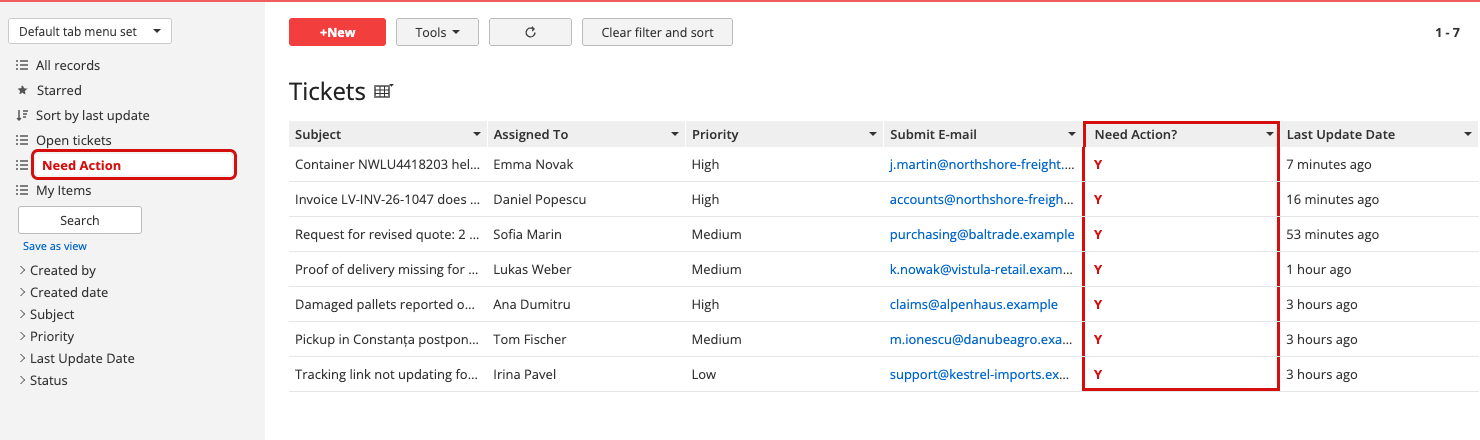
With Ragic saved filter, you can set up the criteria, for example, all records where the Need Action field is marked as Y, meaning there’s no resolution yet, and save it as a filter. In one glance, you can see which tickets still need to be handled. You can also set up a notification email for this filter, so there’s an extra reminder and nothing gets missed.
Category: Applications > Templates